
Mobile Net Switch – Mobile Net Switch Quick
Launcher
Download the Free! add-on "Mobile Net Switch Quick Launcher" (QMNS).

Download:
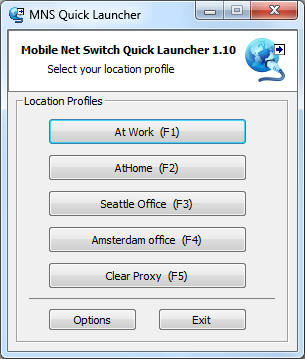
QMNS is a front-end interface for Mobile Net Switch. It allows you to specify
five profiles to be activated with the click of a button.
Configuration:
Please note; QMNS requires Mobile Net Switch to be installed first.
To use QMNS, download it from the link above and save the file in the \Program
Files\Mobile Net Switch\ directory. Please also create a shortcut to the desktop
and/or start menu for easy access to QMNS.
When QMNS is started for the first time, the first five Mobile Net Switch
profiles will be added as buttons to QMNS.
To activate a profile, click the corresponding profile or Function key (F1 for
the first profile, F2 for the second, etc)
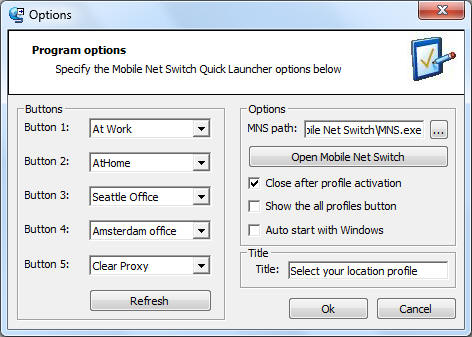
To modify the configuration of QMNS, click the Options button.

Buttons frame:
Select the profiles you want to add, select the first empty entry from the drop
down list to clear (disable) that button.
Options frame:
MNS Path: QMNS will automatically detect the path of the Mobile Net
Switch executable (MNS.exe). Use this field to manually modify the MNS.exe path.
Close after profile activation: Specifies if Mobile Net Switch must be close
automatically after
a profile has been activated
Show the all profiles button: This will enable the 'Show all profiles' link
on the QMNS main page. this enables you to activate more then five profiles
using QMNS
Auto start with Windows: QMNS will be automatically started when Windows
starts (this feature will disable the auto-start feature of Mobile Net Switch to
prevent them from starting both)
For administrators:
To disable the Options button and prevent users from modifying the QMNS
settings, edit the following registry key:
HKEY_CURRENT_USER\Software\QMNS\LockConfig
Set the value to True
Version history:
Below you will find an overview of the improvements and modifications made in
previous versions:
Version 1.10 (latest version);
- Added a (profiles) refresh button to the options menu
- When QMNS is first started, a shortcut will be automatically created on the
desktop and in the start menu
- Several minor improvements made to the program and user interface
Version 1.09;
- Allows you to blank or hide buttons (in case you are using less then 5
profiles)
- Added an option to specify the title bar text (default = 'Select your location
Pofile')
Version 1.08;
- Removed references to the Windows Scripting Host and replaced them with API
commands
(this increases performance and prevents problems with the McAfee
ScriptStopper)
Version 1.07;
- Bug fix: when using Mobile Net Switch in Global Settings Mode (all users on a
system share one set of location profiles), QMNS was not able to retrieve the
profile list from Mobile Net Switch. The problem has been resolved in this
version
Version 1.06;
- Bug fix: On some systems the 'auto start' feature didn't not work correctly, the
problem has been resolved in this version
Version 1.05;
- Several small improvements have been added. For example QMNS will now always
activate a profile using the Function keys (F1, F2, etc) even when the program
doesn't have focus. (the program can lose focus when it starts automatically
along with other programs on your system)
To check the version of QMNS you are using, right click the QMNS.exe, click
properties and select the Version tab. As of version 1.05 the version is also
displayed on the main page of the program.
If you have any questions do not hesitate to contact
us.